
VCOrganizer Enterprise+9.1.3.641 - Get APK
You'll be able to download in few seconds.
Publisher Description
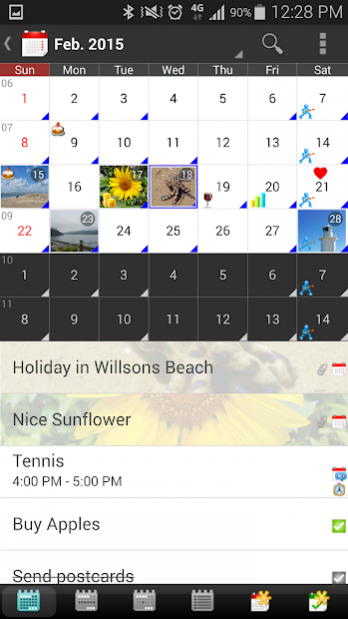
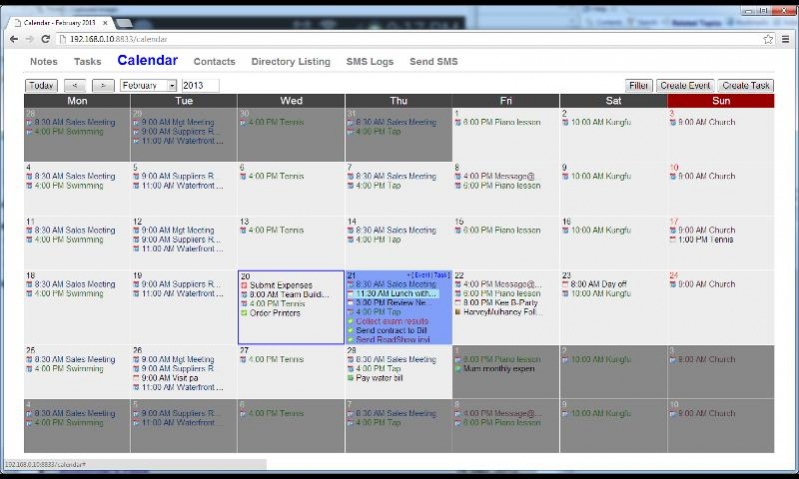
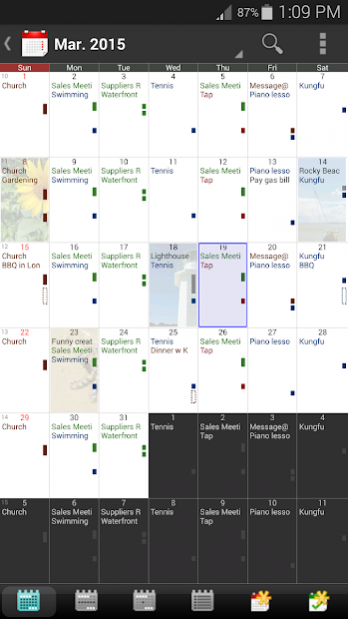
VCOrganizer Enterprise+, one of the Best Android Outlook Sync Apps, secures your important notes, tasks, contacts and events. It syncs with Outlook client using USB, WiFi, Bluetooth or syncs over the internet in real-time..
You can sync your android devices with multiple Outlook clients and multiple Outlook folders . The Outlook events, tasks, contacts, notes, categories can be transferred from one Outlook client to the other Outlook clients.
The is a 15 days free trial version. When the trial period expires, you can still use this app for free, but sync with Outlook will be disabled. You can purchase the licenses from our payment partner (ShareIt - Digital River). It starts from ~US$9.
If you have problem to purchase VCOrganizer Enterprise+, please contact support@vecal.biz.
For more, please visit
http://www.vecal.biz/vcorganizer-pro.html
http://vcorganizer.blogspot.com
http://facebook.com/VCOrganizer
Features
---------
- Sync Outlook Tasks, Notes, Contacts, Events, Categories
- Sync with Outlook using USB,WiFi, Bluetooth
- Remote or Real-time sync with Outlook over internet.
- Sync Outlook sub-folders
- *Sync with multiple Outlook clients (There is no extra costs to sync with multiple Outlook clients)
- Built-in Chat app, which allows user to share items to multiple devices or friends.
- Support Attachments for Notes, Tasks, Contacts and Events.
- Password and Pattern lock
- AES Encryption
- Backup/Restore from SD card
- Web Portal for accessing VCO contents on your phone from the browser on your PC.
- Advanced reminder features such as Auto Snooze, Custom Voice reminder ..etc.
- SmartLinks which links contacts, notes, tasks, events together
- Universal search
- Share Notes, Tasks, Contacts and Events to other apps.
- Notes/Tasks/Events/Contacts Widgets
- Notes/Tasks/Calendar/Contacts Shortcuts
- Build-in Notes, Tasks, Calendar and Contacts App, it also sync with Android Contacts and Android Calendar on your device.
- AutoSync and AutoBackup ***
- Advanced Filter (e.g: Contacts in Category A or B, and with keywords in notes "XYZ")
- Create/edit recurring event (Daily/Weekly/Monthly/Yearly, no end date, end by occurrences, and end by date) . The recurring pattern can be synced back to Outlook.
e.g:
Occurs every 2 day(s) effective 27 Dec 2011 until 27 Dec 2012 from 10:00am to 11:00am
Occurs every Tuesday,Friday effective 27 Dec 2011 until 27 Dec 2012 from 10:00am to 11:00am
Occurs day 27 of every 2 month(s) effective 27 Dec 2011 until 27 Dec 2012 from 10:00am for 2 days
Occurs the third Tueday of every 3 month(s) effective 27 Dec 2011 until 27 Dec 2012 from 10:00am to 11:00am
Occurs every 2year(s) on January 17 effective 27 Dec 2011 until 27 Dec 2012 from 10:00am to 11:00
Occurs the second Tuesday of January effective 27 Dec 2011 from 10:00am for 2 hours
- Support MS Outlook Client 2003, 2007, 2010 & 2013, 2016 (32bit, 64bit)
This app supports all the languages, and with the following user interfaces:
English, French, German, Spanish, Italian, Chinese (Traditional / Simplified)
* The sync software (SyncCenter) on your PC is free. You can install it on more than one PC, and sync Outlook data across these PC.
Note:
*******************************************
1) Online Help:: http://www.vecal.biz/vco_ent.html
2) If you have any problem, please visit our forum or send email to support at support@vecal.biz:
http://www.vecal.biz/forum.htm
About VCOrganizer Enterprise+
The company that develops VCOrganizer Enterprise+ is Vecal Company. The latest version released by its developer is 9.1.3.641.
To install VCOrganizer Enterprise+ on your Android device, just click the green Continue To App button above to start the installation process. The app is listed on our website since 2019-04-22 and was downloaded 0 times. We have already checked if the download link is safe, however for your own protection we recommend that you scan the downloaded app with your antivirus. Your antivirus may detect the VCOrganizer Enterprise+ as malware as malware if the download link to com.vecal.vcorganizerentplus is broken.
How to install VCOrganizer Enterprise+ on your Android device:
- Click on the Continue To App button on our website. This will redirect you to Google Play.
- Once the VCOrganizer Enterprise+ is shown in the Google Play listing of your Android device, you can start its download and installation. Tap on the Install button located below the search bar and to the right of the app icon.
- A pop-up window with the permissions required by VCOrganizer Enterprise+ will be shown. Click on Accept to continue the process.
- VCOrganizer Enterprise+ will be downloaded onto your device, displaying a progress. Once the download completes, the installation will start and you'll get a notification after the installation is finished.
Program Details
System requirements
Download information
Pricing
Version History
version 9.1.3.641
posted on 2019-04-22
Remove the SEND_SMS, READ_SMS, READ_CALL_LOG, WRITE_CALL_LOG permissions due to the new Google policies.
version 9.1.3.423
posted on 2015-04-29
Release 9.1.3.423,1. Display Photos in Notes (List View and Grid View) and Tasks List View,2. Show Android Calendar events in VCO Calendar (For Android 4+),3. Create/Edit/Delete Android Calendar events from VCO.,4. Please also download the latest VCOrganizer Outlook AddIn 3.1.115,Please visit our blog for details:,http://vcorganizer.blogspot.com,Download SyncCenter and VCOrganizer AddIn:,http://www.vecal.biz/downloads.php
version 7.1.3.245
posted on 2013-06-06
Several fixes and updates
Disclaimer
External Download
We do not host VCOrganizer Enterprise+ on our servers. We did not scan it for viruses, adware, spyware or other type of malware. This app is hosted by Galad and passed their terms and conditions to be listed there. We recommend caution when installing it.
The APK Download link for VCOrganizer Enterprise+ is provided to you by apps112.com without any warranties, representations or guarantees of any kind, so access it at your own risk.
If you have questions regarding this particular app contact the publisher directly. For questions about the functionalities of apps112.com contact us.
